Showing posts with label cell. Show all posts

Saturday, July 24, 2010

Samsung Galaxy S: Even More Sour

[This is a followup to earlier message]

All right, a week into the game.

GPS is still broken

Not only it is broken, the Internet is full of copy & paste of a bogus advice on how to improve it (bottomline: MS Based GPS, which, let's be honest, is not quite that GPS).

Worst of all, Samsung is mum on the issue. Had they said or did something along the lines of what Motorola did when the screen issue with Droid X was discovered, I'd calmly wait until they either issue a firmware fix or replace the phone. However, nothing happened, and, as a result, both phones will most probably be returned before the end of 14 days grace period. Maybe people returning phones will teach Samsung what the value of listening to the customer is.
Historical note: back at the beginning G1's GPS performance was as bad if not worse. It did get fixed, though, and today it is a very usable and reliable GPS source. Too bad if Vibrant's GPS problems are of software nature.

Car charger does not produce enough power to keep the battery up when Navigation is active

Yes, you've read that right. The battery charge goes down, even though the phone reports itself as "charging". A deal breaker for heavy Navigation users.

The phone reboots the UI when GPS activity is present

MyTracks is particularly vulnerable to this problem. Start recording a track, walk around, you're very likely to have the phone partially rebooted in a few minutes. Those Linux enabled will realize that it's the UI layer that is getting restarted.

GPS activity causes the phone to lock up

Again, start MyTracks and watch the phone freeze, sometimes for tens of seconds at a time.

Multiple SD Card Issues

At least under Windows XP (hasn't tried Linux yet, but that's kinda irrelevant), connecting the phone to the computer produces two drives, both of which report "Please insert disk into Drive NN" when you try to click on them.
After every other reboot, or an attempt to mount drives to a computer, the Media Scanner runs and in a short while reports either "Blank External SD Card" or "External SD Card Damaged". Of course it isn't - a reboot or plugging/unplugging the USB cable fixes the issue. Half of the time.

The Verdict

No go. Both phones go back to the store before the end of grace period. Real shame, it's a beautiful phone, with nice build quality, very good otherwise, with a screen that has no rivals.

Deal Breaker

Let me emphasize again that the reason for making a decision to return phones is lack of reaction from Samsung. For this much money, ($100 for the phone + $30/month for 24 months = $820, multiply by two = $1640) they better be listening. If they don't, I'd rather take my money somewhere else - HTC Ace, maybe?

Tuesday, July 20, 2010

Samsung Galaxy S' Sour Notes

Good

As usual, if you want to read positive reviews, use Google. If your heart works normally, there's no reason for you to notice it.

Bad

I'm afraid most of these things are caused by the Android UI "adaptation" by Samsung known as Touchwiz. We'll see what Froyo brings.
  • The phone is making an obnoxious noise when it boots up;
  • The phone is making an obnoxious noise when it shuts down (did they ever think that most often the phone needs to be shut down in an inconspicuous way?);
  • There is no way to put a shortcut to Navigation directly onto the home screen (my venerable G1 can do that with no problem) (Maps update took care of that);
  • Contacts & Dialer are like Siamese twins separated at birth and trying to get together again;
  • There are "Groups" in both Contacts and Dialer, but I wasn't able to add a contact into a group yet, having spent quite some time;
  • The meaning of "link the contact" escapes me, need to RTFM TFM doesn't have an answer;
  • There is no indicator light when the phone is connected to the charger. If your charger is accidentally unplugged, you're screwed;
  • When you press the on/off button, the phone feels like it's about to slip out of your hand;
  • Did I mention the phone is extremely slippery? I'd much rather have a plain non-slip surface like my G1 has than a shiny accident-prone one if an ambiguous aesthetic value. Good thing there is a spare cover in the box, I might want to experiment with painting it;
  • There is a "TV Out" feature, but no TV connector came in the box, TFM has no mention of it, either;
  • Given the power socket/USB placement (top left), it is clear that connecting the phone to a car mount would be cumbersome and the cord is going to stick right up into your field of vision if placed vertically (that's the way I prefer it). The only cure against that that I can think about is a dedicated cord with an angle connector;
  • The user manual sucks - none of questions asked above have an answer there.

Ugly

  • No notification lights - a real turnoff;
  • I wasn't able to find a way to assign a custom ringtone to a caller - basic functionality. Not a show stopper, but definitely very annoying;
  • The phone makes a sound when connected to a charger. Very inconvenient for many people, for they plug the phone into the charger when their SO is already asleep a meter away;
  • The "USB Connected" notification stays on after the USB is disconnected, there's no way to evict it other than a reboot;
  • Windows XP is able to see mounts offered by the phone, but is unable to read them ("Please insert disk into drive X:"?);
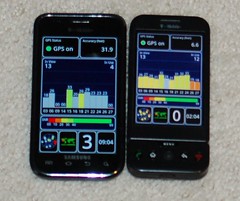
  • Worst of them all: GPS is broken and unusable for navigation (takes forever to acquire GPS signal, loses it on a whim, the location is often off by a block or more). Apparently, a quick fix exists (yet to try it and see if it helps), but it doesn't work - it's a crutch and not a real fix, at least for my phone. 2 (most of the time) to 4 (sometimes) satellites out of 11 are locked on Vibrant, vs. 6 to 10 on G1 within a meter.

Fugly

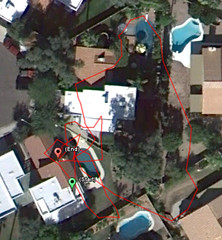
Samsung Vibrant GPS Performance

The picture above represents the travel path of a "fixed" (see above) phone left running MyTracks for half an hour while laying immovable on a table.

Samsung Galaxy S vs HTC G1
The picture above shows the Vibrant's GPS readings against G1's. Click on the picture and read the notes.

Back to Good

Having said all that, it is a very good phone overall (hardware is above criticism, and software has a chance to get fixed). Worth noticing:
  • Ability to create a shortcut for a navigation destination. Very convenient;
  • Slide right to call and slide left to message on a contact in the contact list is nice;
  • Ability to send back an SMS when responding to a call is commendable (though "I'm driving" response looks kinda silly there);
  • Fast feature switching (WiFi, Bluetooth, GPS, Silent) from the notification bar is absolutely cool (though an ability to configure this would be even better, for example, GPS and Bluetooth are never switched off on our phones, but we need more fine grained control over notifications).

The Verdict

Bought two phones, no regrets so far from neither end user (one of them former Blackberry, the other former G1 user) UPDATE: probably going back to the store. Hasn't been fourteen days yet, though. And it remains to be seen if Samsung can fix the GPS issue OTA, or it is a hardware problem.

P.S.: The best feature? The phone fits perfectly into the pouch that came with G1.

UPDATE: Added a note about broken GPS.
UPDATE: And another note about broken GPS.
UPDATE: Added a picture of the GPS deviation.
UPDATE: And one more, comparing Vibrant GPS against G1.

Wednesday, September 10, 2008

BlackBerry Curve 8320: Overheating, Battery Drain Continues

I was wrong, Google Maps for Mobile is off the hook.

The phone keeps overheating and draining battery once or twice a week. The pattern is still unclear - sometimes it seems to be related to installing new applications (over the network) or fiddling with existing network-aware applications (Google again), sometimes seems to be related to a race condition between cell and UMA networks.

Pisses me off, honestly.

The only guaranteed way to get out of it without guessing whether it snapped out of it or not for the next few hours is to give it a hard reset - i.e. take out the battery, plug it back in and wait forever until it boots.

I know I'm not alone -

Search for blackberry power drain
Search for blackberry overheating

Wonder how long it will take RIM to admit the problem (so far the official statement I got from tech support is "we've never heard of it") and fix it.

It is also interesting to note that iPhone suffers from the same problem (search for "iphone overheating").

There's one thing that makes me really nervous - it's one thing if it is just a runaway process beating its head against the wall and draining the battery, and completely different thing if it this process keeps transmitting on full power all this time from my pocket. Totally uncool.

Wednesday, August 13, 2008

BlackBerry Curve 8320: Mystery Overheating, Battery Drain

Suddenly found the phone quite hot, with the battery completely drained. At first I thought that I just kept the keyboard jammed in my pocket for a few hours - said to myself, no big deal, I'll just charge it overnight.

In the morning, the phone was still hot - I thought, no big deal, it's just been charging.

Then the battery charge started rapidly disappearing again. Cold reboot helped.

Trivial analysis would offer an educated guess - there was a runaway process consuming CPU and power. Too bad BlackBerry in production configuration doesn't offer any diagnostic tools...

So I just wrote it off as a weird bug.

Until the next time it happened, few days later.

Primary suspect: Google Maps for Mobile. Not everything is clear at this point, but it seems that the necessary conditions are:

  • fetching driving directions;
  • following the route;
  • driving through a no reception zone (not sure).
Apparently, the My Location feature, dependent on cell tower triangulation, is implemented in a way that goes nuts once in a while and just drains the battery. I am also wondering what does it do to sustained radiation emission levels - can't imagine the hot device in my pocket not pinging stations like crazy on maximum power level when this bug is triggered.

Interestingly enough, a similar problem was reported for iPhone 3G (read this, search for "draws") - apparently, it is possible to drain the battery faster than the power adapter charges it.


Last time, it was possible to stop the drain by closing Google Maps - it took me a few tries, however, and I'm not sure how exactly did I get the BlackBerry out of that condition. Let's see if this happens again, and what would Google do to Maps to fix this.